
Improving PDF Data Extraction with Latest AI Technology
A Much-Needed Tool
Extracting tables from PDF documents is a crucial feature for various professional and personal applications. Accountants, for instance, often need to retrieve financial tables for quarterly reports, spending hours manually transcribing data. Researchers face the challenge of manually extracting and consolidating tables from numerous PDFs when compiling data from multiple studies. Similarly, small business owners analyzing receipts and invoices greatly benefit from an efficient table extraction tool to keep their finances organized. Even individuals occasionally need to convert receipts or tax return forms into Excel sheets for personal record-keeping.

Challenges with Existing Tools
Many current table extraction tools have significant limitations and frequently fail to meet user expectations. For example, Adobe Acrobat Pro’s extraction tool often struggles with correctly aligning columns and rows. Camelot is limited to tables with clear border lines, restricting its functionality. OCR-based tools, such as table2xl.com, mechanically “copy” tables to Excel sheets but lack the intelligence to handle complex tables and nuances. Similarly, DocParser requires users to define parsing rules within templates, necessitating extensive upfront work and lacking the flexibility to automatically adapt to changes.
What we need is a tool that requires minimal upfront effort from users, can handle tables with or without borderlines, spanning multiple pages, and can extract data from various forms, including bar charts, pie charts, and embedded text. The result should be ready for immediate use in Excel or other downstream applications, requiring little to no post-processing.
A New Tool Powered by AI
Inspired by state-of-the-art models like ChatGPT, I developed a new tool that leverages advanced AI technologies to extract data from PDF documents into CSV format. This tool addresses the limitations of existing solutions and has shown promising results in extracting various types of data with higher accuracy and flexibility.
This innovative tool combines traditional PDF parsing, OCR, and advanced AI to intelligently extract and organize tables. It handles tables with or without borders, merges tables from multiple pages, and extracts data from various formats like bar charts, pie charts, and embedded text. Users can specify data and format requirements using natural language, making the process efficient and user-friendly. Imagine seamlessly converting complex financial reports or detailed research studies into manageable Excel sheets with pinpoint accuracy. This tool is set to revolutionize data extraction, saving time, reducing errors, and enhancing productivity.
How to Use the Tool
Visit the website https://extract.freeappdemos.com, and follow the instructions: upload your PDF document, specify the data you want to extract and the page number where your data is located, then hit the “extract” button. The tool will automatically extract the data and present it in a tabular format. You can also download the data as a CSV file onto your local drive.
Please note: Pay attention to page numbers. Sometimes, the page number used by the software may not be the same as that printed in the page. When using the tool, ensure the page number you specify matches the one shown in the toolbar above the document viewer.
Examples of Use Cases
Here are some examples of use cases.
Extracting Financial Data Table Without Border Lines
First we test with the balance sheet from a public company’s annual report. The original document page is shown in the document viewer. Users only needs to tell the tool that they want balance sheet data, and it is in page 24. The extracted table is shown in the lower part of the demo page. At the bottom, there is a download button to save the extracted data into a local CSV file. With minimum modifications, the data can also be transmitted to a database or other online systems.
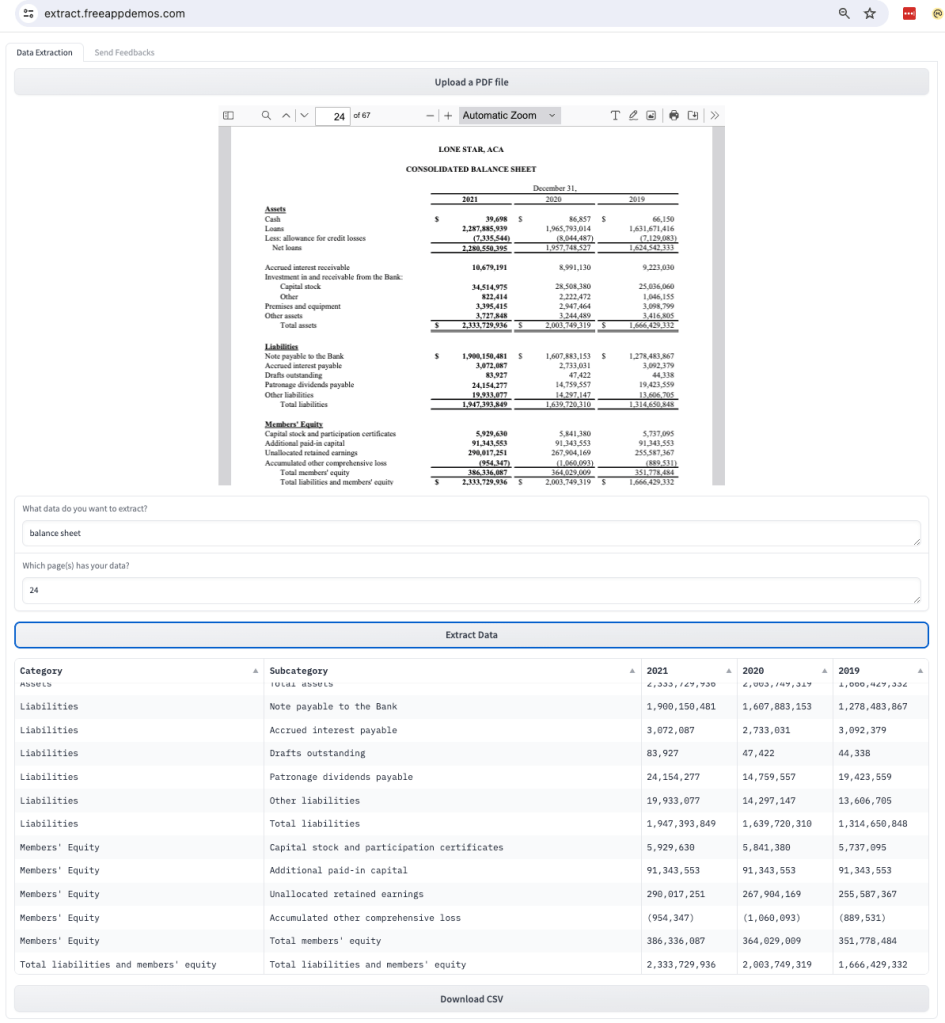
Note that the table does not have enclosing border lines. This type of table, which lacks border lines, is often difficult for existing tools like Camelot to extract. However, our tool handles it with ease.
Extracting Data from Multiple Pages
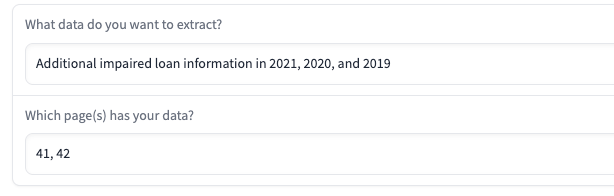
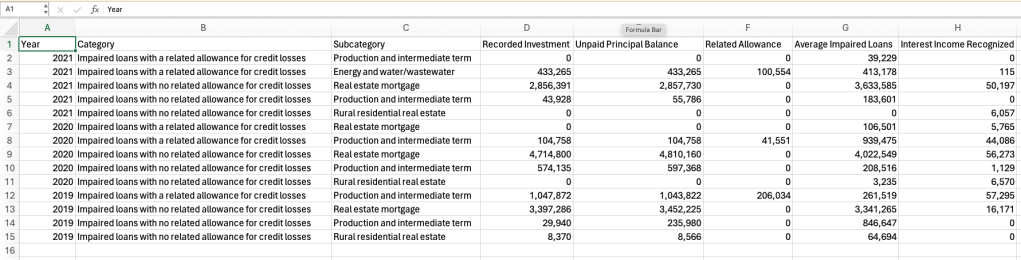
Next, let’s examine a more complex example where relevant data is spread across multiple pages. Here, we are interested in extracting loan impairment data that spans two pages, pages 41 and 42. Additionally, there is other information (income interest) on page 42 that we are not interested in, presenting another challenge for existing tools.
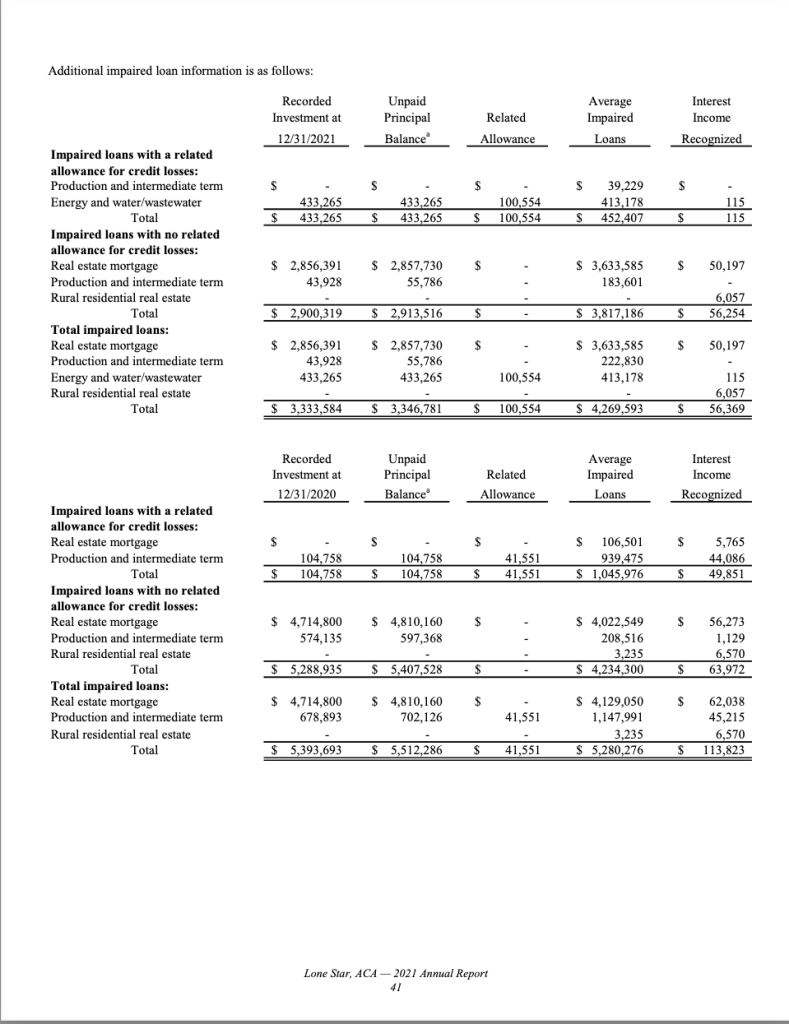
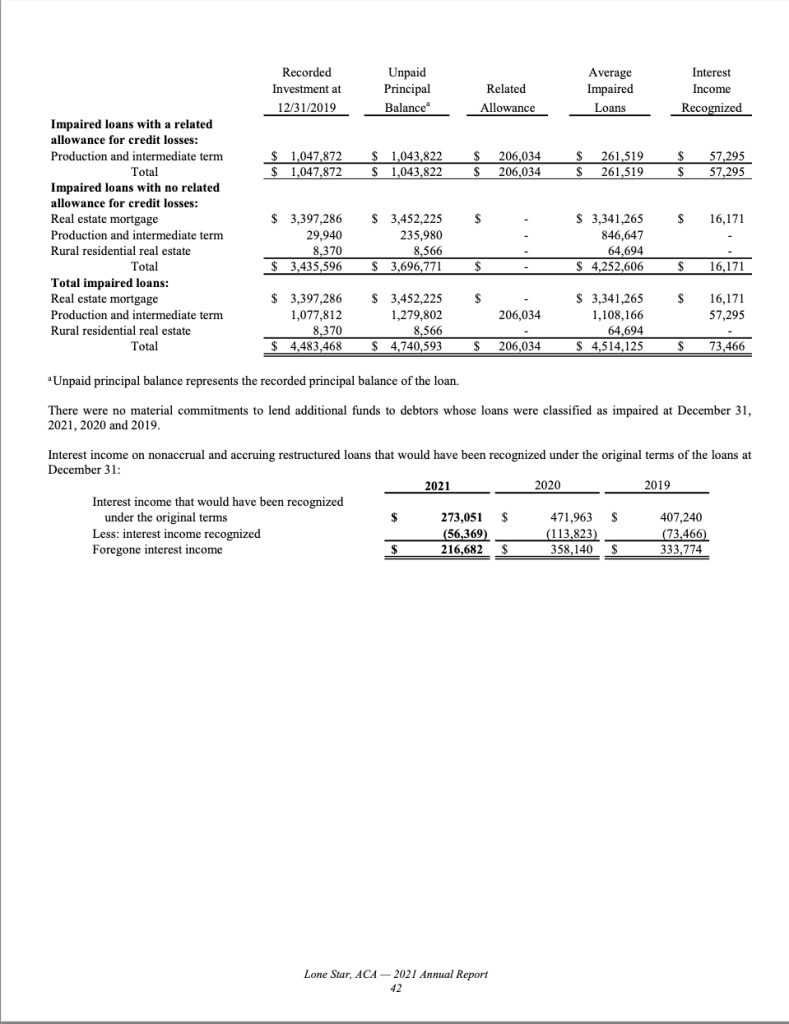
With this tool, all you need to do is provide the two page numbers, and the tool will automatically combine the data into one table. The result in downloaded CSV file is shown below.
Extracting Data from a Pie Chart or Bar Chart
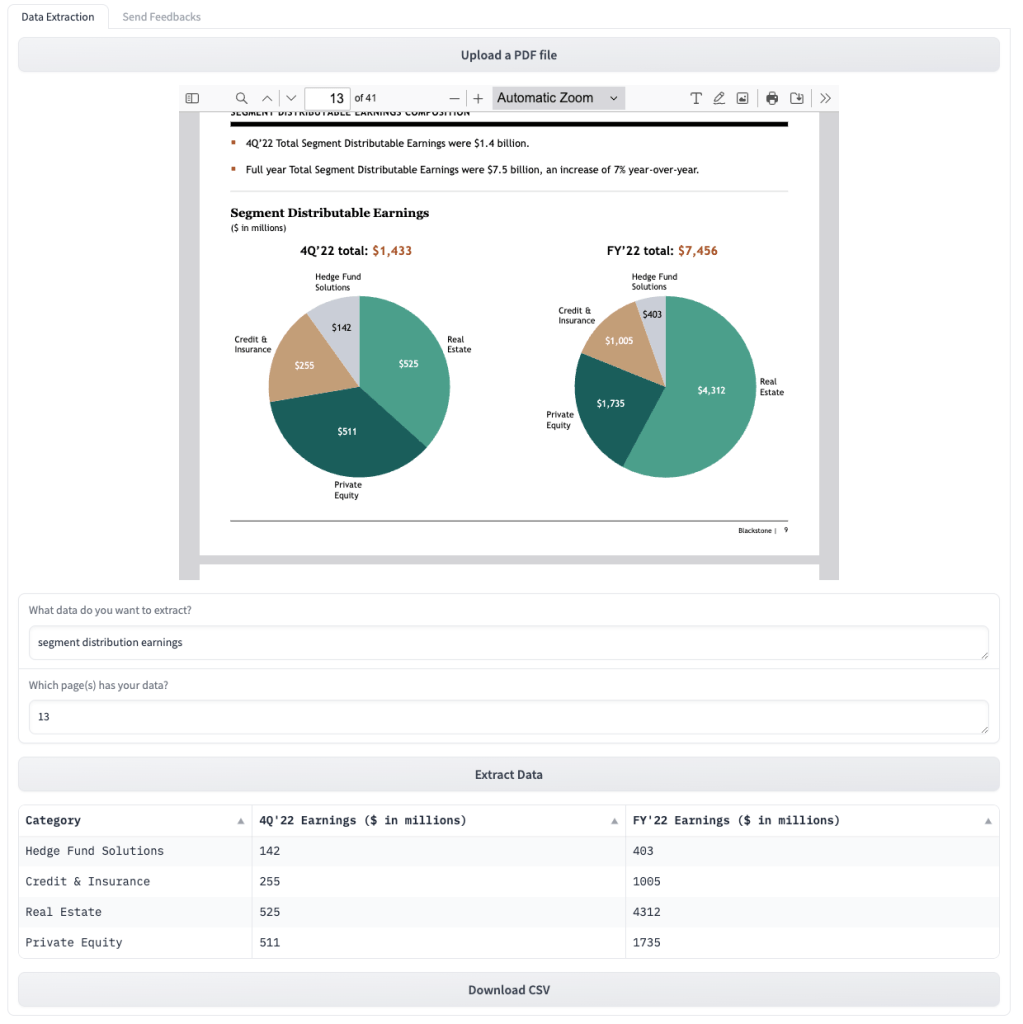
Finally, we demonstrate that the tool can extract data from other types of data representations. Here we have two pie charts on a page showing the distribution earnings of major segments for Q4 and the year total. Users only need to tell the tool what data they are interested in as in previous cases, without worrying about the format of the data representation.
Some Limitations
- This tool is currently in the demo phase and should not be used for sensitive data. Avoid uploading confidential information.
- The tool leverages generative AI models, which may produce different results with the same input on multiple runs.
- While improvements over existing tools are notable, challenges remain. The tool might struggle with tables that span multiple pages or pages with very complex layouts.
Summary
This is my attempt to improve the data extraction tool with the latest AI technology. I tried to combine traditional PDF parsing, OCR, and advanced AI technologies to extract data from PDF documents into tables of CSV format that ready for another automated process. After some testing, this tool shows promising results in extracting various types of data from complex PDF documents with higher accuracy and flexibility. Although there are still some limitations and areas for improvement, I am optimistic about the future of data extraction from documents using the latest AI technology.
You are welcome to try the tool, and if you have any comment or suggestion, please leave your feedback from the demo page (there is a feedback tab in the demo app). Your feedback is valuable to help me improve the tool further.
Demo page: https://extract.freeappdemos.com

Leave a comment