
It is great to have the Ask command in VimAssist to allow users to ask questions and get answers from their local folders. But I found that many times, I still need to revise the text inserted by the `Ask` command, to make it fit better in the context. In addition, even without using the `Ask` command, I often need to revise my own text in the writing process. Surely, I can copy my text to ChatGPT or other AI tools to get it revised, but it is not convenient. After all, the goal of VimAssist is to enable users to do everything without leaving Vim.
Today, I introduce a new `Revise` feature to the VimAssist plugin. With this new command, users can revise selected text or add new content in Vim, based on user’s specific instructions. The revised or new text content will be inserted back at the current cursor position.
In the Vim, users can first select the text they want to revise, and then use the shortcut `\r` to trigger the `Revise` command. After the command is triggered, it will ask user for specific instructions, and then insert the revised or new text back to the Vim.
Let’s see how it works through 3 examples.
## Example 1: Transform the content to a bullet list
I was working on a presentation about how Machine Learning is used in cybersecurity operations. As my usual way of making decks, I first wrote my ideas and thoughts into paragraphs, and then convert them into bullet points. In this example, I wrote a paragraph about NIST’s cybersecurity framework, then I used the `Revise` command (via the shortcut `\r`) to ask the tool to convert the paragraph into a bullet list.

## Exmaple 2: Expand the content
In this example, I just wrote a few short sentences and phrases about my ideas, and then asked `Revise` tool to expand the content to a full paragraph with more details. It is able to do that because, under the hood, the plugin sent the selected text along with the rest of of the document to LLM, so the model understands the context and can expand content properly.

## Example 3: Add new content
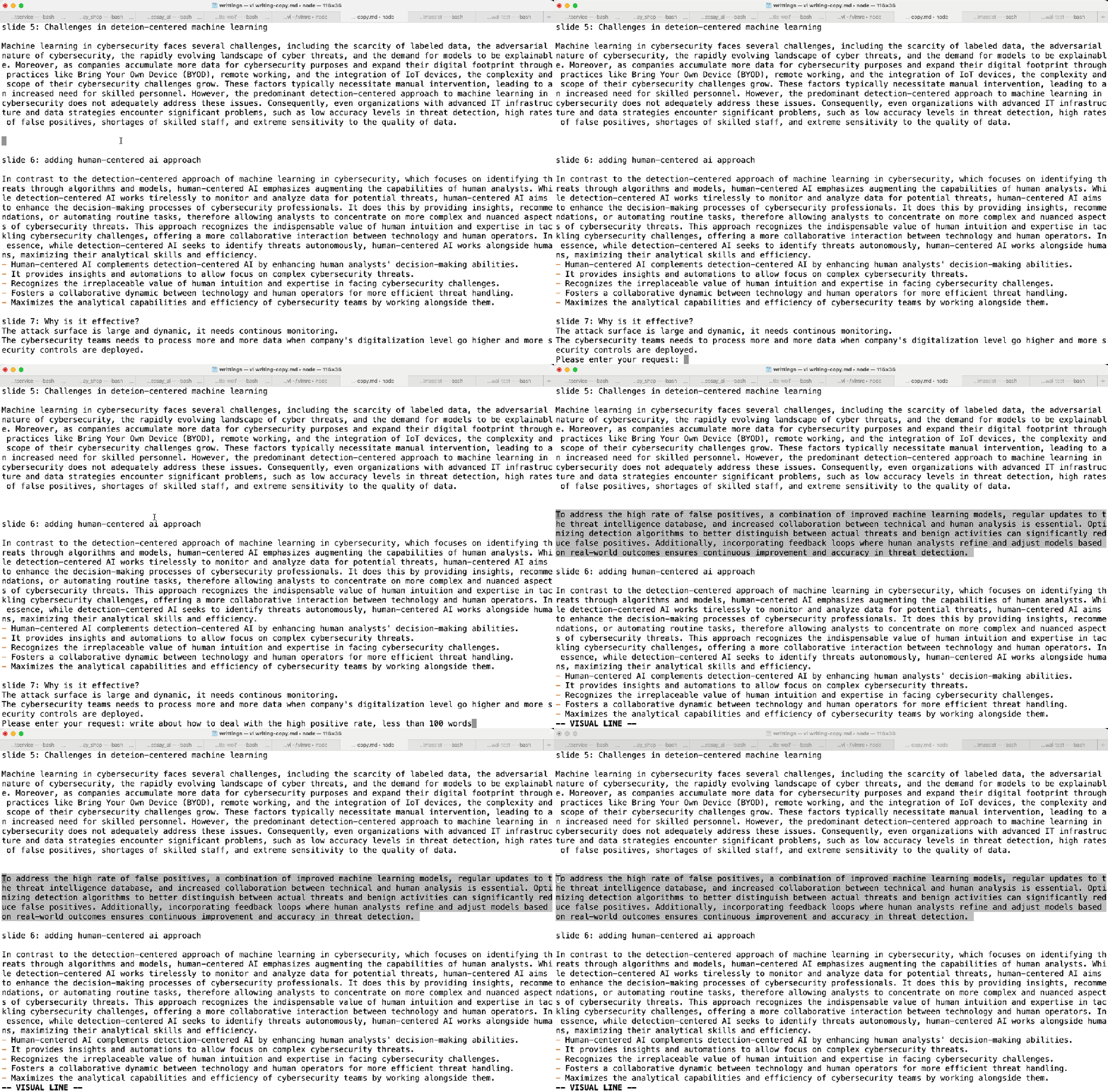
In this example, I was writing a part about the challenges of using AI in cybersecurity, and the high false positive rate is one of them. Then I used the `Revise` command to ask the tool to add more details about how we can deal with this particular challenge. The tool was able to generate a paragraph (less than 100 words as instructed) for this topic. Note that, I did not have to select any text in this case, I relied on the LLM to give its own answer based on the context.
If you are using the tool, I hope you will enjoy the new Revise feature, along with the Ask feature. If you are not using the tool yet, you hope you can give it a try:
https://github.com/sluosapher/VimAssist

Leave a comment