
The problem
One tough challenge of AI application is how to integrate it into people’s daily work and life. I mean, it’s great to have ChatGPT and even GPT store, where you can find various customized chatbots for different kind of jobs. But, you still need to logon to OpenAI’s website to use it, and you still need to copy & paste between its chat window and your work. Even you did all of this, the chatbot may not be able to get enough context to understand your needs. After all, it is running in a separate window, and it has no idea what you are doing in your work.
The solution by Github Copilot
So, how about we put the AI into your favorite editor, so that it can understand your needs better? And, how about we make it a plugin, so that you can use it in any editor you like? This is what Github Copilot is doing: it works inside several IDE and editors including VSCode and vim, it understands what you are typing, and it can autocomplete the content based on what you alredy wrote. it is an awesome tool that helps us write code (in VSCode) and articles (in vim).
This is a great starting point, but it is still not enough. Particularly, I cannot ask it to complete content with something it does not know. For example, I have a bunch of notes of recent meetings, and I want AI to help me to write what my boss thinks about a specific topic, in my editor. I cannot do this with Copilot, because it was not trained with my notes. Another example would be a researcher working on his paper, and he would like AI to insert a paragraph about an experiment results from a newly published paper. Again, Copilot cannot do this, because it does not know the content of the other paper.
A supplemental solution
There are technical approaches that alllows AI to answer questions with user-provided knowledge. This approach is called RAG (Retrieval-Augmented Generation). Basically, the idea of RAG is to find relevant context from user’s knowledge base, and then use the context to generate the prompt, and then get the answer from LLM (Large Language Model). Many AI projects are using RAG under hood, such as OpenAI’s chatgpt-retrieval-plugin project (https://github.com/openai/chatgpt-retrieval-plugin). But the challenges is how we can integrate RAG into user’s daily work. For me, the problem is how to integrate RAG into vim, so that I can use it to write content about my notes and papers.
I have been working on a RAG project called chatdocu (https://www.chatdocu.ai), which is a chatbot that can answer questions with user’s uploaded documents. Here a document means a pdf, a ppt, an url link to a web page or a youtube video. The chatbot works fine, but again, the limitation is that users can only use it in a browser.
Fortunatly, I own the engineering work behind it, so I can make it work in vim. Here is how I built the demo:
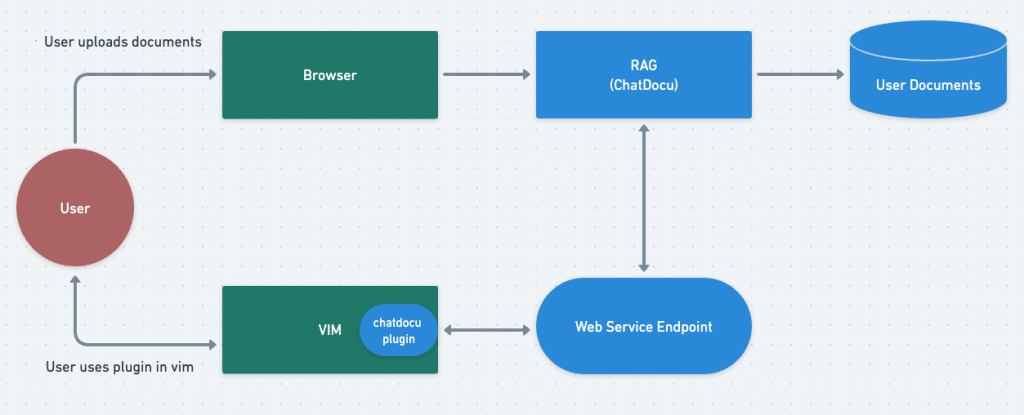
1. Upload user’s documents to chatdocu’s online database, and create a knowledge topic with the document. We use it as the default topic in our PoC. This is done on chatdocu’s testing web site.
2. Create an internal function that takes user’s question as input, and then call OpenAI’s API to get the answer. This is done with minimal modification to chatdocu’s existing code.
3. Create a web service endpoint that takes user’s question as input, and then call the internal function created in step 2.
4. This is the most complex part. Create a “chatdocu” vim plugin, and define an “:Ask” command for it. When user types “:Ask” in vim’s command mode, the plugin will collect user’s question after :Ask, and send it to the web service endpoint created in step 3. Then after it receives answer, it will insert the answer into vim’s current buffer.
The simplified architecture is shown below:
The PoC demo
After working on it for a few days, I have a working PoC. Here is a demo.
Note that in the demo, the Github copilot generates text in shaded color, and the user launches chatdocu plugin by typing “:Ask” at the bottom of the screen. The plugin then sends the question to chatdocu’s web service, and inserts the answer into vim’s editing area.
In this demo, I was writing a summary of the new NSA Cybersecurity Report. As we can see, the copilot keeps suggesting new content, but its suggestions are either general knowledge or not relevant to the report. On the other hand, the chatdocu plugin can answer questions about the report, and it inserts the answer back into vim. I believe people’s writing efficiency will be greatly improved if they use both copilot and this plugin.
The next step
This work does not have much value if only I can use it, or it can only be used in vim. Here is my plan to make it more useful:
* Besides the vim plugin, I plan to create plugins for MS Word, Google Doc, and maybe other more popular editors.
* I plan to host the backend functions as a public web service, so everyone can upload their documents, and start using the RAG-based Q&A in their favorite editor.
Conclusion
When we write, we hope we own the idea of what we are writing, and we keep our own styles. But we want to offload simple tasks to AI, such completing simple sentences following our ideas, or looking up facts from our own documents. This is the reason why I created this plugin. I hope it can help people to write more efficiently without losing total control to AI.
Let us be augmented, not replaced, by AI.


Leave a comment